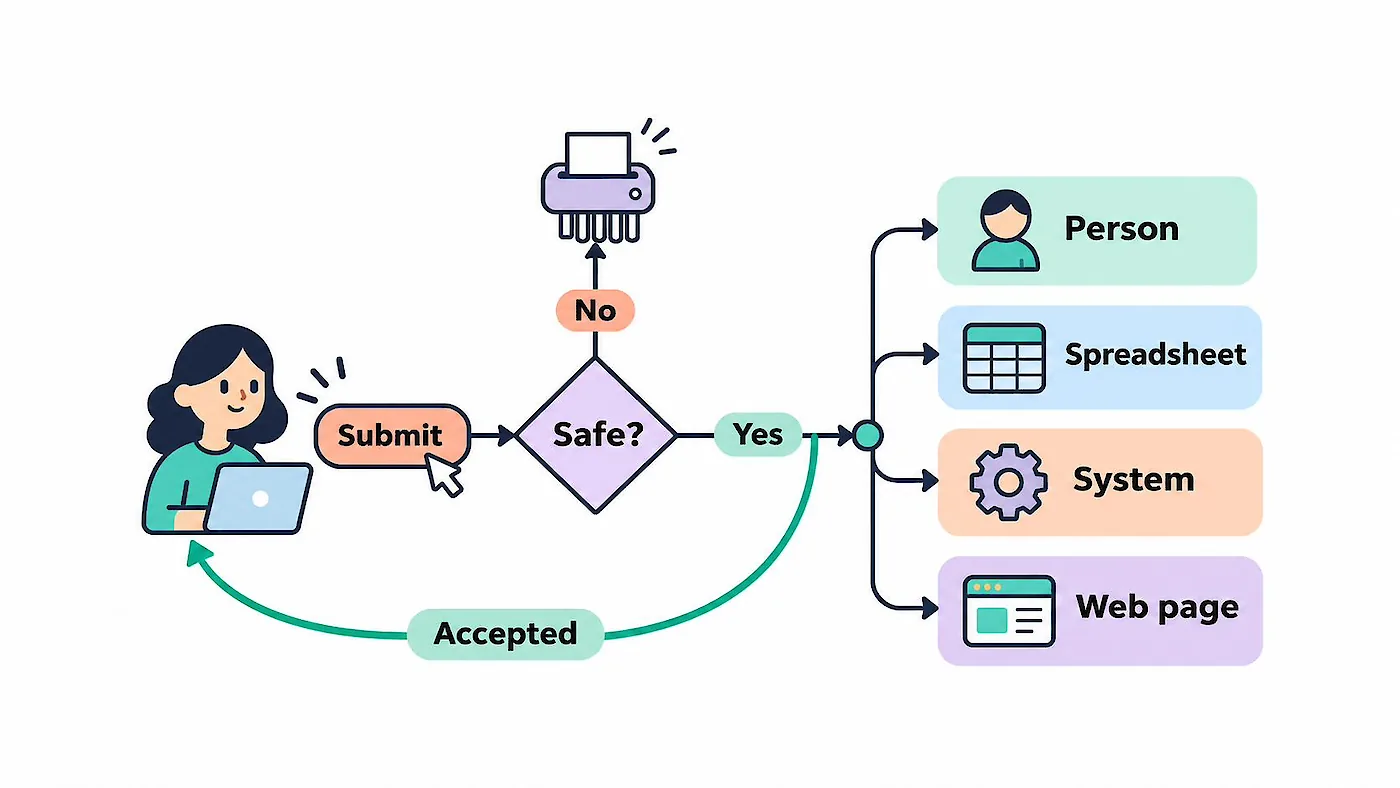
Information submitted through a website form can be a business asset. Follow it beyond the submit button to see how it can reach the right person, support a process or guide a visitor.
A visitor has taken the time to fill in a form on your website. They might be asking about a service, telling you what they need or providing details for another purpose.
The information they have chosen to share can help your business respond and decide what needs to happen next. It is a business asset.
So what happens to it after they press submit? Where does it go, who or what uses it, and does the process still suit the way your business works?
Start with what you need the information to do
Think about one of the forms on your website and why someone completes it.
For a contact form, that might be as simple as sending an enquiry to the person who will respond. Another form might collect information in a spreadsheet, pass it to another business system, or use an answer to take the visitor to a relevant page. A form may do more than one of these things.
When an enquiry needs to reach a particular person
Ladies Running Errands has franchisees serving different locations. An enquiry needs to reach the relevant franchisee, so the visitor's location is an important part of the process. The website needs a way to identify the appropriate recipient and direct the enquiry to them.
The Ladies Running Errands website story looks at the broader work of making its customer journey clearer.
A business with several offices may have a similar need. Location, or the kind of enquiry, may determine who is best placed to respond. A business with one person handling enquiries may only need a single inbox.
Decide who is responsible for responding and what information they need. Where requests are directed to different people, consider what should happen if one cannot be matched to a recipient.
What else could the information help you do?
An answer about location or needs might help direct someone to a relevant page.
Information can also be passed to a system your business already uses. That might mean adding details to a spreadsheet or using a connection between systems, often called an API, to begin another process.
If you keep submitted information, think about where it belongs, who needs access and how it will be looked after. Ask for information that serves a clear purpose and be clear with visitors about how it will be used.
Check that the process still works
I recently came across a website that had not been touched for 10 years and was still working. It raised a simple question: where were the enquiries going?
An email address that made sense when a website was built may not be the right one years later. People leave, responsibilities change and inboxes fall out of use. A form can still be sitting on the page, ready for a visitor to complete, even if nobody is quite sure what happens after they do.
If you are unsure about a form on your website, find out where its submissions go and who has access to them. You may need help from the person who manages your website or email. The same question applies when information is passed to another system: does it still reach the place where the business expects to use it?
Ask for useful information
Once you know what needs to happen with the information, consider whether the form collects enough to make that possible.
If important details are missing, the first response may need to be a request for more information. But asking every possible question upfront can make the form longer than it needs to be.
Think about the purpose of the form and what happens after it is sent. A general enquiry may only need contact details and a message. A request that needs to be directed to a local service may also need the visitor's location.
Ask the people responsible for responding what they need. If another system uses the information, check what it needs too. The answers can help you decide what to ask the visitor and where the information should go.
Let the visitor know what to expect
After submitting a form, a visitor should be able to tell whether it has been sent. A clear confirmation message can also explain what happens next, where that is useful.
Sometimes a visitor is taken to another page rather than shown a message. Check that each answer leads somewhere appropriate and that the visitor understands what to do there.
Keep the wording consistent with the actual process. If an enquiry goes to a franchisee who will contact the visitor to discuss availability, say that rather than suggesting an appointment has already been booked.
Check the whole journey
Pick a form on your website and follow it as a visitor would. Agree on a safe way to test it first, especially if a submission starts another process. Then use clearly labelled test details and check where the information goes and what happens afterwards.
As you follow it through, consider:
- Is the form asking for the information needed at this stage?
- Is the information safe to pass on?
- Does the visitor receive a clear confirmation or reach the appropriate next page?
- Where is the information sent or stored, and who can access it?
- Does it reach the right person, system or process?
- Is there enough information to respond or complete the process?
- What happens if a request cannot be directed or a handoff does not work?
Consider how the form handles spam and checks submitted information before passing it on. Some submissions may need to be rejected or held for review rather than sent straight into the business process. The person who manages your website can help you check what protections are in place.
Repeat the check when a recipient, office, service area, connected system or responsibility changes. If your form has several possible routes, arrange to test the relevant paths with the people responsible for them.